New

Domain Burn Alerts: free detection for SmartLead and Instantly. Domain Burn Alerts: free for SmartLead & Instantly

Check your domains

Free Email Deliverability Checker

Analyze reply rates by provider, domain, and tag to uncover what's silently killing your results.

Fill the form to get :

Run a Free Email Deliverability Test

Enter your credentials to generate your personalized report.

Please enter a valid email address.
Please choose a sequencer.
API Key is required.
*Your API Key is used one-time for the report only.
Please fill in all fields

Kai Footprint, Growth Yard, Spark Lead and more increased deliverability by 2x

What We Check to Test Your Email Deliverability

Deep insights into your email performance with beautiful, actionable
analytics across multiple dimensions

Provider Performance Comparison

Compare reply rates, bounce rates, and click rates across all your email providers

Google Workshop

2.1%

Outlook

1.8%

Custom SMTP

1.1%

Campaign Performance Intelligence

Deep dive into your most successful campaigns and discover what's driving results

Q4 Outreach

EXCELLENT

4.2%

2,450

Reply Rate

Emails Sent

Lead Generation

GOOD

2.1%

1,890

Reply Rate

Emails Sent

Domain Health Analysis

Identify problematic domains and ESP providers affecting your deliverability

Decorative icon for the deliverability report

yourdomain.com

2.1%

Google Workshop

Good

Decorative icon for the deliverability report

backup.com

0.8%

Custom SMTP

At Risk

Decorative icon for the deliverability report

old-domain.com

0.3%

Outlook

Problematic

Tag Performance Analysis

Performance breakdown by campaign tags to identify your most effective segments

Cold Outreach
3.2%
5,240
Follow Up
2.1%
2,130
Event Promotion
1.4%
890
Re-engagement
2.8%
1,560

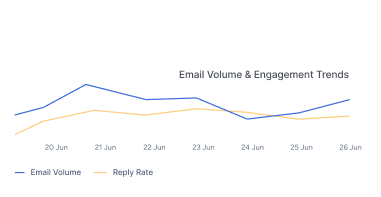
Weekly Performance Trends

Track your email volume and engagement trends over time with beautiful charts

Line chart showing email volume and reply rate trends over a week

Ready to increase your email
deliverability?

Frequently Asked Questions

How does Aerosend deliverability checker work?

Our email deliverability checker runs a full diagnostic on your sending domain and generates a deliverability report. It consists of clear scores and the exact fixes that are required to land in the inbox instead of spam.

All you need to do is enter your email, email sequencer and API key. We will analyse your DNS records, plus SPF, DKIM, and DMARC authentication and reputation signals across major inbox providers like Gmail and Outlook.

Here’s the playbook behind every check – Email Deliverability Guide

How do I test my email deliverability?

Email deliverability monitoring is the process of tracking where your emails are potentially landing by identifying patterns. You can test your email deliverability using the deliverability checker. Here’s how we monitor your email deliverability.

What does the deliverability checker test?

The checker inspects your domain’s DNS records, SPF, DKIM, and DMARC authentication. Additionally we check your domain reputation and blacklist signals that inbox providers use to decide whether your emails reach the inbox. Every result comes with an actionable fix.

What is a good email deliverability score?

A healthy sending domain typically scores 90% or higher, meaning authentication is correctly configured and reputation signals are clean. A lower score usually points to missing DNS records or authentication gaps. Learn how the deliverability score is calculated.

Is the email deliverability test free?

Yes. The deliverability checker is completely free and returns instant results with no credit card or signup. Aerosend is an email deliverability platform that also offers managed warmup and monitoring when you need ongoing support.

Coming Soon
SPF/DKIM/DMARC Checker Soon

Validate your email authentication

Blacklist Checker Soon

Check if your domain or IP is blacklisted

Email Spam Checker Soon

Test if your email lands in spam

How to Get Your Instantly API Key
Step 1 : Log in to Your Instantly Account
Go to https://app.instantly.ai/auth/login and log in to your account
Step 2 : Navigate to Settings

Click on your profile icon in the bottom-left corner, then select “Settings” from the dropdown menu.

Step 3 : Select Integration

In the Integrations page, click on the “API Keys” tab in the left sidebar.

Step 4 : Get Your API Key with all:read Scope

If you already have an API key with the all:read scope, you can use that key.


If not, click the “Create API Key” button, select the all:read scope, and make sure to save your new API key somewhere safe.

How to Get Your Smart Lead API Key
Step 1 : Log in to Your Smart Lead Account
Go to https://app.smartlead.ai/login account and log in to your account
Step 2 : Navigate to Settings

Click on the “Settings” option in the top right corner profile icon.

Step 3 : Select API Integration

In the Settings page, under your profile picture, you can see the SmartLead API Key.

Step 4 : Generate Your API Key

If you already have an API key displayed, you can use that key. If not, click the “Generate API Key” button to create a new one.